Fallstack Part 0.b: Fundamentals of Web Apps
Fundamentals of Web Apps
HTTP GET
The server and the web browser communicate with each other using the HTTP protocol.
- Inspect –>
Networktab –>HeadersGeneral: request URL, request method, status codeResponse Headers: content length (bytes), content type (e.g.text/html; charset=utf-8)
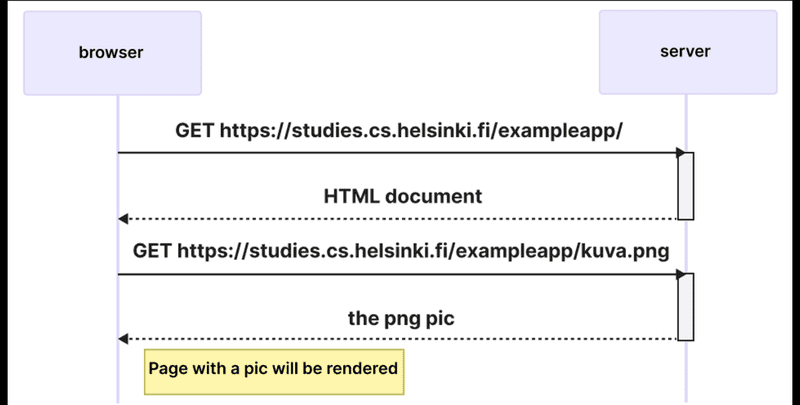
The sequence diagram visualizes how the browser and server are communicating over the time. The time flows in the diagram from top to bottom, so the diagram starts with the first request that the browser sends to server, followed by the response.
First, the browser sends an HTTP GET request to the server to fetch the HTML code of the page. The img tag in the HTML prompts the browser to fetch the image kuva.png. The browser renders the HTML page and the image to the screen.
Even though it is difficult to notice, the HTML page begins to render before the image has been fetched from the server.
Running application logic in the browser
clear()to empty the console- When you go to the
notespage, the browser does 4 HTTP requests:- HTML
document - CSS
stylesheet main.jsJavaScriptscriptdata.jsonraw data (xhr, i.e.XMLHttpRequest)
- HTML
Event handlers and callback functions
Event handler functions are called callback functions. The application code does not invoke the functions itself, but the runtime environment - the browser - invokes the function at an appropriate time when the event has occurred.
Document Object Model (DOM)
The functioning of the browser is based on the idea of depicting HTML elements as a tree. Document Object Model, or DOM, is an Application Programming Interface (API) that enables programmatic modification of the element trees corresponding to web pages.
The topmost node of the DOM tree of an HTML document is called the document object. We can perform various operations on a webpage using the DOM-API. You can access the document object by typing document into the Console tab.
Manipulating the document object from console:
list = document.getElementsByTagName('ul')[0]
newElement = document.createElement('li')
newElement.textContent = 'testing the page manipulation from console'
list.appendChild(newElement)
Even though the page updates on your browser, the changes are not permanent. If the page is reloaded, the new note will disappear, because the changes were not pushed to the server.
Loading a page containing JavaScript
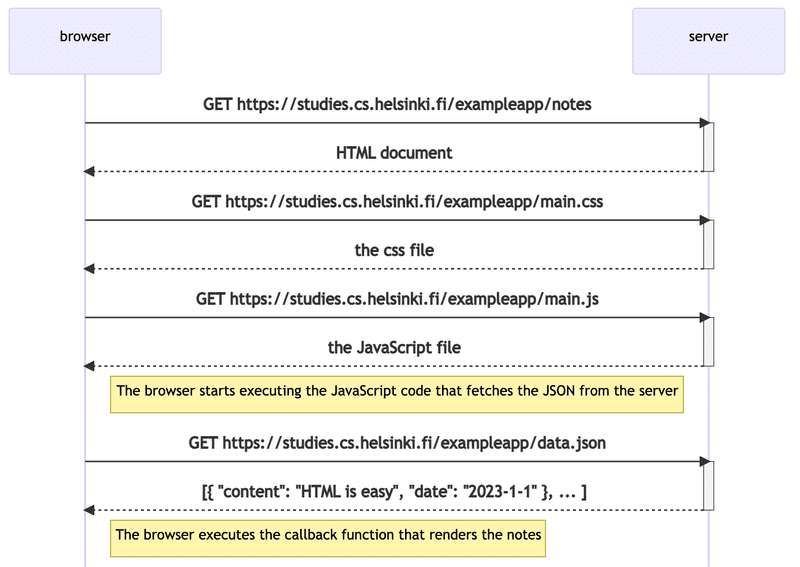
- The browser fetches the HTML code defining the content and the structure of the page from the server using an HTTP GET request.
- Links in the HTML code cause the browser to also fetch the CSS style sheet
main.cssand the JavaScript code filemain.js - The browser executes the JavaScript code. The code makes an HTTP GET request to the address
https://studies.cs.helsinki.fi/exampleapp/data.json, which returns the notes as JSON data. - When the data has been fetched, the browser executes an event handler, which renders the notes to the page using the DOM-API.
Forms and HTTP POST
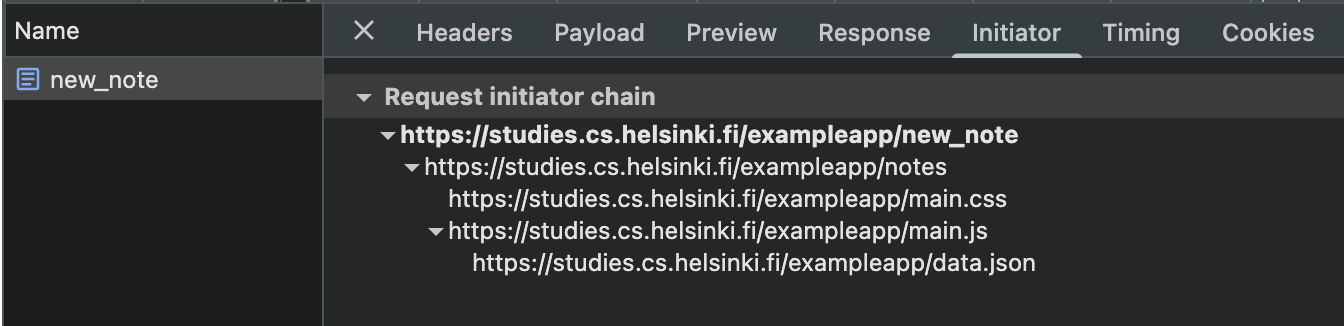
Surprisingly, submitting the form causes no fewer than five HTTP requests. The first one is the form submit event. It is an HTTP POST request to the server address new_note. The server responds with HTTP status code 302. This is a URL redirect, with which the server asks the browser to perform a new HTTP GET request to the address defined in the header’s Location - the address notes.
So, the browser reloads the Notes page. The reload causes three more HTTP requests: fetching the style sheet (main.css), the JavaScript code (main.js), and the raw data of the notes (data.json).
Single page app
In recent years, the single-page application (SPA) style of creating web applications has emerged. SPA-style websites don’t fetch all of their pages separately from the server like our sample application does, but instead comprise only one HTML page fetched from the server, the contents of which are manipulated with JavaScript that executes in the browser.
The Notes page of our application bears some resemblance to SPA-style apps, but it’s not quite there yet. Even though the logic for rendering the notes is run on the browser, the page still uses the traditional way of adding new notes. The data is sent to the server via the form’s submit, and the server instructs the browser to reload the Notes page with a redirect.
A single-page app version of our example application can be found at https://studies.cs.helsinki.fi/exampleapp/spa. At first glance, the application looks exactly the same as the previous one. The HTML code is almost identical, but the JavaScript file is different (spa.js) and there is a small change in how the form-tag is defined. The form has no action or method attributes to define how and where to send the input data. Open the Network tab and empty it. When you now create a new note, you’ll notice that the browser sends only one request to the server. The POST request to the address new_note_spa contains the new note as JSON data containing both the content of the note (content) and the timestamp (date). The Content-Type header of the request tells the server that the included data is represented in JSON format. Without this header, the server would not know how to correctly parse the data. The server responds with status code 201 created. This time the server does not ask for a redirect, the browser stays on the same page, and it sends no further HTTP requests.